


PillEye – tablet, pill counter
3.8322.00 Reviews
App Specs
- Version
- 3.13.2
- Updated On
- License
- Free
- Downloads
- 500,000+
- Developer
- Medility
- Categories
- Medical
- Platform
- Android, iOS
Screenshots
 Analysis by AppCompare
I find that a pill counter earns a place on my phone only if it remains useful after the first curious test. PillEye is a focused medical app from Medility: its central job is to estimate how many tablets or pills appear in a photo. That narrow purpose is also its appeal. It is not a medication schedule or a substitute for professional checks; it is a camera-based aid for one repetitive task. The first impression is quick and practical, but the more important question is whether the image-taking workflow fits the way you actually handle medication.
Where the first-week appeal comes from
The initial attraction is easy to understand. Instead of moving each tablet into a counted pile, I can arrange them for a picture and let the app produce an estimate. For someone who rarely needs to count a batch, that may be enough to make a tedious chore feel manageable. The free download lowers the barrier to trying it, while in-app purchases are listed from $7.49 to $25.99 per item, so I would check what is included before relying on any paid option.
A realistic use is a caregiver checking the remaining supply in a weekly medication container before planning a refill. The app may help with the count, but it cannot tell whether the medication is the right one, whether a dose was taken, or whether the supply will last safely. I would use it as a second pair of eyes, then compare the result with the prescription label and the actual medication. That distinction matters: a neat number on a screen is not a clinical verification.
What makes the camera workflow practical
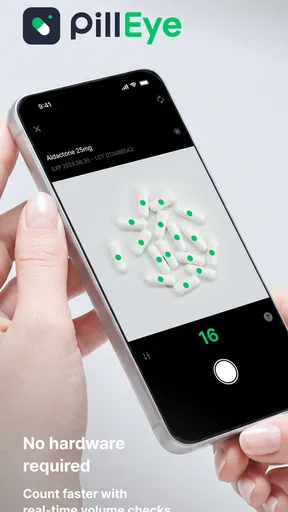
The core process is simple: take a picture, review the count, and adjust the image conditions if the result looks questionable. Lighting and contrast are not cosmetic details here. Before taking the photo, I would spread the tablets so their edges are visible, choose a plain background that contrasts with their color, and avoid shadows from the phone or nearby objects. Those small habits can make a visual count easier to inspect, whether the app gets the first result right or not.
This also explains where the app can be more useful than mental arithmetic. A pharmacist or stockroom worker dealing with a batch may find a photo-based check less tiring than repeatedly counting by hand, especially when the same kind of task comes up throughout a shift. Yet I would not treat a camera count as the final word in a dispensing workflow. When the count affects a patient’s supply, the result deserves a manual check, particularly if tablets overlap, have unusual shapes, or appear against a busy surface.
Month-to-month value depends on your routine
For occasional home use, I would not expect PillEye to transform medication management. Its recurring value depends on whether pill counting is a real, repeated task for you. A person who handles several prescriptions for a household may appreciate having a quick way to check quantities, while someone who takes a single daily medicine and rarely handles a full bottle may open the app only once and forget it. The app makes most sense when counting is frequent enough that saving attention matters.
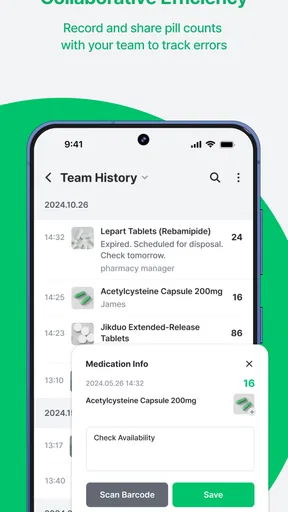
It can also support a simple record-keeping habit. If you save a count or share it, you can pass the result to a caregiver or keep it alongside your own notes. I would make the note useful by including the medication name and the date outside the image-counting step, rather than assuming a saved number explains itself later. A count without context can be confusing when several containers or strengths are involved.
Worth Reading Before You Choose

EA SPORTS FC Mobile 26 Is a Bigger Football Game, but It Takes Time

Flipboard Shows What News Apps Must Do Beyond the Feed

Switching to Android Auto Means Rethinking Your Driving Routine

Google Calendar Makes a Crowded Week Easier to Manage

Ludo King Makes the Most of the Minutes Between Plans

Baby Panda World Brings Quick Play to Modern Phones, but Its Game Library Feels Busy
PillEye has an average rating of 3.9 from around 1.6 thousand ratings, and it has been installed over 500 thousand times. Those figures suggest that plenty of people have tried it, but they do not guarantee that it will handle every tablet or setup equally well. It is free to install, rated for Everyone, and currently at version 3.9.2; the stated minimum Android requirement is 6.0. I would treat those practical details as a starting point, not a promise that every device camera will deliver the same result.
The maintenance burden is small, but not zero
This is not the kind of app that asks for a complicated routine, yet it rewards a little care each time you use it. You need a clear surface, enough light, and a photo in which separate tablets can be distinguished. If the first image produces a doubtful result, taking another picture with better spacing or lighting is more sensible than accepting the number just because the scan was fast. That extra step is the real maintenance cost: preparing the scene and checking the output.
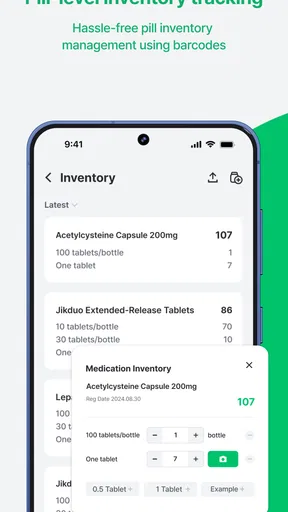
There is also a human maintenance task that the camera cannot take over. Medication stock changes when a bottle is opened, doses are taken, or a prescription is adjusted. If you are keeping counts over time, update your own notes when those changes happen; otherwise, yesterday’s saved count can become misleading. I would avoid treating the app as an automatic inventory system. It helps with a snapshot, while keeping that snapshot meaningful remains your responsibility.
When a different method is the better choice
For a handful of large, distinct tablets, counting by hand may be quicker than setting up a photo. At the other extreme, a busy pharmacy handling high volumes may need a validated process and staff checks rather than relying on a phone image alone. PillEye sits between those cases: it can reduce repetitive visual work, but it does not remove the need for judgment. Compared with a basic calculator or a paper tally, it can estimate from an image; compared with a dedicated professional workflow, it should be treated as a convenience rather than a replacement.
I would also be cautious with tablets that touch, overlap, or blend into the background. A common temptation is to photograph a crowded pile and assume the app can separate every edge. In practice, arranging a single visible layer is a better test of the tool than asking it to interpret a heap. If a count is important and the picture is ambiguous, pause and recount manually instead of repeatedly changing image settings until a preferred answer appears.
What can make the novelty wear off
The biggest source of fatigue is not learning the app; it is the repeated setup around a task that may not happen often. Finding a clean surface, arranging pills, taking a picture, and checking the result can feel like extra work when there are only a few tablets. People who want reminders, dose tracking, refill alerts, or a complete medication list should look for a medication-management app designed around those needs. A focused counter should not be mistaken for an all-in-one health organizer.
Another limitation is that the count is only as useful as the image. Irregular shapes and close spacing can make the result less dependable, and changing brightness or contrast cannot resolve every ambiguity. In my view, that is a reason to keep a manual verification habit, not a reason to dismiss the app outright. The right question is whether it saves effort on your ordinary batches while still leaving enough time to catch a doubtful scan.
Getting Acquainted with PillEye
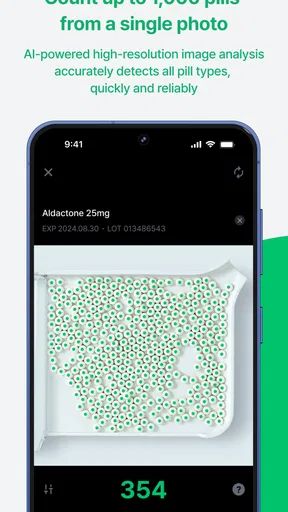
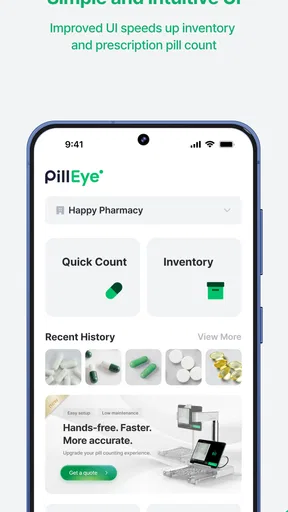
So, what exactly is PillEye? It’s an app that uses your phone’s camera to count tablets and pills. Yes, you heard that right! Using advanced image recognition technology, it can accurately count pills in just a few seconds. This is especially handy for pharmacists, caregivers, or anyone who regularly deals with medication.
Setting It Up
First things first, downloading and installing the app is pretty straightforward. Available on both Android and iOS, you can grab it from the respective stores with ease. Once installed, the setup is a breeze. There’s a quick tutorial that guides you through the process of using your camera to snap a picture of your pills.
After you’ve taken the picture, the app gets to work, analyzing the image and counting the pills. I was genuinely impressed by how quickly it could scan and deliver results. It’s like having a personal assistant in your pocket!
Features That Stand Out
One of the highlights of PillEye is its simplicity. The interface is clean and intuitive, which means you won’t have to fumble around trying to figure out how to use it. The app also offers a detailed breakdown of the count, which can be really useful if you’re managing multiple medications.
Moreover, the app allows you to save and share your counts. This feature comes in handy when you need to report to healthcare providers or keep a record for personal tracking. It’s like having a digital diary for your medication management.
Another cool feature is the ability to adjust the settings to improve accuracy. You can tweak the brightness and contrast to ensure the app captures the pills perfectly, regardless of lighting conditions.
Practical Applications
Imagine having a large number of pills to count. Doing it manually can be tedious and error-prone. With PillEye, you just snap a photo, and voila – your count is done! It’s especially useful in professional settings like pharmacies, where precision is crucial.
For caregivers and individuals managing several prescriptions, this app can be a lifesaver. It simplifies the process and reduces the risk of human error, ensuring that you or your loved ones are taking the correct dosage.
My Personal Take
As someone who’s always looking for ways to streamline tasks, PillEye has been a pleasant surprise. It’s straightforward yet efficient, making it an essential tool for anyone dealing with medications regularly.
While the app excels in many areas, there’s always room for improvement. Occasionally, the app struggles with counting pills of irregular shapes or when they’re too close together. However, these instances are rare and usually resolved with a slight adjustment of the camera or lighting.
Would I recommend PillEye? Absolutely. Whether you’re a healthcare professional, caregiver, or someone who just wants to stay organized with their medication, this app is worth checking out. It’s a small download that can make a big difference in how you manage your pills.
So, if you’re tired of endless counting or simply want a reliable tool to assist you, PillEye is your go-to solution. Give it a try, and you just might wonder how you ever managed without it!
Who I’d Keep It For
After the novelty fades, I would keep the app installed only if pill counting returns often enough to justify the small preparation ritual. It is a sensible fit for caregivers checking household supplies, people who handle several containers, and pharmacy staff who want a quick visual estimate before a proper check. It is less compelling for someone seeking reminders or a personal dose history, and I would not use it to make decisions about what medicine to take.
One useful habit is to separate the counting task from the medication decision. Count a clearly arranged batch, compare the result with the label or your own inventory, and then record the context if you need to share it. If the count is unexpected, do not keep adjusting the picture until the app gives a convenient number; start again with a clearer arrangement or count manually. That keeps the tool in its proper role: a time-saver for visual counting, not an authority on treatment.
My lasting verdict is positive but specific. PillEye earns a place for people who regularly face repetitive pill counts and are willing to check what the camera sees. It is not necessary for every medicine cabinet, and it cannot replace careful handling or professional procedures. If your everyday batches are clear and frequent, it can make the chore lighter; if they are rare, tiny, or safety-critical without a second check, the familiar manual method may be the better choice.
Pros
- Accurate pill counting feature.
- User-friendly interface.
- Supports multiple languages.
- Quick setup process.
- Regular updates and support.
Cons
- Limited free version features.
- Requires stable internet connection.
- No dark mode option.
- Ads in the free version.
- Limited customization options.
FAQs for PillEye – tablet, pill counter
What is PillEye and how does it work?
PillEye is an innovative app designed to accurately count tablets and pills using your smartphone's camera. It utilizes advanced image recognition technology to scan and count the pills in seconds, ensuring precise medication management. This makes it particularly useful for individuals managing multiple prescriptions or healthcare professionals needing a reliable pill counting tool.
Is PillEye available for both Android and iOS devices?
Yes, PillEye is available for download on both Android and iOS platforms. You can find it on the Google Play Store for Android devices and on the Apple App Store for iOS devices. Ensure your device meets the app’s system requirements for optimal performance.
Are there any subscription fees or in-app purchases?
PillEye offers both a free version with basic features and a premium version that unlocks advanced functionalities. The premium version may include features like ad-free usage, enhanced image recognition, and priority support. Check the app’s listing on your device’s app store for current pricing and any available promotions.
How accurate is the pill counting feature in PillEye?
PillEye boasts a high accuracy rate due to its sophisticated image recognition technology. However, accuracy can be influenced by factors such as lighting conditions and camera quality. For best results, follow the app’s guidelines for optimal pill placement and lighting during scanning.
Is my personal data safe while using PillEye?
PillEye takes user privacy seriously and implements robust security measures to protect your data. The app requires minimal permissions and does not collect unnecessary personal information. Always review the privacy policy and terms of service to understand how your data is handled and stored.


